Problem: Show the list of all employees from the employee table having second highest Salary or Nth highest salary in the organization.
Solution: Well we can achieve the result by so many ways but in this post I would like to do it by using co-related queries.
Query to get the list of employees getting 2nd highest salary (Set the value of @SalaryPosition to get Nth highest salary):
SELECT * FROM Employee E1 WHERE @SalaryPosition = ( SELECT COUNT(DISTINCT E2.Salary) FROM Employee E2 WHERE E2.Salary >= E1.Salary )
Co-Related Query: In short, it’s a type of nested sub query where the inner query is referenced to some value of the outer query. And the inner query is executed for each record in the outer query making it slowL.
In our query, to get the 2nd highest salary, works in the same way too. Let’s dive a little deeper.
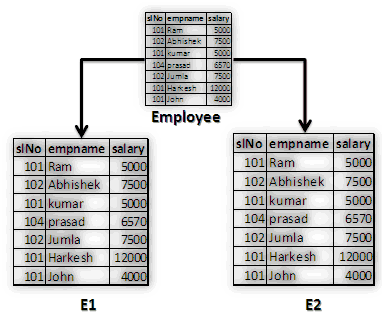
Sample data used in employee table:
slNo empname salary
101 Ram 5000
102 Abhishek 7500
101 kumar 5000
104 prasad 6570
102 Jumla 7500
101 Harkesh 12000
101 John 4000
So we have taken two aliases for the employee table i.e. E1 and E2.(Here N=2)

Corollary: Let’s take the first record in the table E1 where the salary is 5000 and assume it as the second highest salary. But how will you know if it is actually the second highest salary or not. If 5000 is the second highest salary, then the distinct count of all the salaries from table E2 which are greater than or equal to 5000 must be 2.

The first record from E1 (salary = 5000) will be compared to all the records in E2 (salary).
Table E1 Table E2 Distinct count where
(considering the first record only) (distinct salary) salary is >= 5000
5000 4000 4
5000
6570
7500
12000
Hence 5000 is not the highest salary as we have 4 more salaries greater than equal to 5000. But it is concluded that 5000 is at the fourth position.
Now let’s take the second salary from table E1 and do the same comparison as in the earlier case.

The second salary is 7500 and as per rule the count of distinct salaries greater than equal to 7500 must be 2.
Table E1 Table E2 Distinct count where
(considering the second record only) (distinct salary) salary is >= 5000
7500 4000 2
5000
6570
7500
12000
Here in this case our condition in the where clause of outer query is satisfying.
Note:-Please comment and reply me.
Solution: Well we can achieve the result by so many ways but in this post I would like to do it by using co-related queries.
Query to get the list of employees getting 2nd highest salary (Set the value of @SalaryPosition to get Nth highest salary):
SELECT * FROM Employee E1 WHERE @SalaryPosition = ( SELECT COUNT(DISTINCT E2.Salary) FROM Employee E2 WHERE E2.Salary >= E1.Salary )
Co-Related Query: In short, it’s a type of nested sub query where the inner query is referenced to some value of the outer query. And the inner query is executed for each record in the outer query making it slowL.
In our query, to get the 2nd highest salary, works in the same way too. Let’s dive a little deeper.
Sample data used in employee table:
slNo empname salary
101 Ram 5000
102 Abhishek 7500
101 kumar 5000
104 prasad 6570
102 Jumla 7500
101 Harkesh 12000
101 John 4000
So we have taken two aliases for the employee table i.e. E1 and E2.(Here N=2)
Corollary: Let’s take the first record in the table E1 where the salary is 5000 and assume it as the second highest salary. But how will you know if it is actually the second highest salary or not. If 5000 is the second highest salary, then the distinct count of all the salaries from table E2 which are greater than or equal to 5000 must be 2.

The first record from E1 (salary = 5000) will be compared to all the records in E2 (salary).
Table E1 Table E2 Distinct count where
(considering the first record only) (distinct salary) salary is >= 5000
5000 4000 4
5000
6570
7500
12000
Hence 5000 is not the highest salary as we have 4 more salaries greater than equal to 5000. But it is concluded that 5000 is at the fourth position.
Now let’s take the second salary from table E1 and do the same comparison as in the earlier case.

The second salary is 7500 and as per rule the count of distinct salaries greater than equal to 7500 must be 2.
Table E1 Table E2 Distinct count where
(considering the second record only) (distinct salary) salary is >= 5000
7500 4000 2
5000
6570
7500
12000
Here in this case our condition in the where clause of outer query is satisfying.
Note:-Please comment and reply me.